Your gateway to secure banking from the comfort of your home!
Bank AL Habib Netbanking empowers you to manage all your finances with an enhanced platform that makes banking simple and easy. Whether you're looking to check your balance, pay bills, transfer funds or print statements; our Netbanking and mobile app has got you covered.
3 Simple Steps to Start


View Dashboard
Perform Transactions
- Balance Inquiry
- Cheque Book Request
- Cheques in Closing
- Change Password
- Funds Transfer
- Bill Payment
- Account Usage
- Online Self-Registration
- One time password for each transaction
- Multiply Funds Transfer
- Multiple Bill Payments
- Digital Statement
- WHT Certificate
- Online Stop Cheque
- Balance Inquiry
- Transaction details
- Credit Card Payment
- Account Statement
Minimum Requirement Of Internet Browser For AL Habib Netbanking
The new Internet Banking service platform is a world renowned system with best in class features, and is named Bank AL Habib Netbanking providing you with more value added services and enhanced security features.

Google Chrome
Latest Version

Mozilla Firefox
Latest Version

Apple Safari
Latest Version

Microsoft Edge
Latest Version
Introducing a convenient
Digital Banking Platform
Our new digital banking enables you to easily manage your finances on the go from almost anywhere! With a host of new features it is designed to make your digital banking experience more convenient, quick and secure.
What's New ?
- Multiple Funds Transfer
- Forex Calculations
- Multiple Bill Payments
- Transaction based OTP
- Instant Stop Cheque facility
- Retrieve user ID by using “forget user ID option without calling the helpline
- Credit Card bill payment of other banks through the 1BILL feature
- Set frequent payments as favourites on the main dashboard
- Withholding tax & balance certificate
- If you are an iBanking user CLICK HERE


What is Device Binding?
Device Binding is a technology that extracts unique properties from the customer's device to mark it as a Registered Device. It also notifies the customer of access to Net Banking/Mobile Application from an Untrusted Device. Additionally, if a customer marks a Device as a Trusted Device on OTP screen, then the OTP is not required by customer upon logging-in from their Registered Devices in future.
Key Features
- Device Binding strengthens the security control and protects from real time fraud.
- Customers may bind more than one device and maximum of three devices as their Trusted Device.
- When Customer logs in from an Untrusted Device, Alert messages notifies that someone has logged in from an unauthorized device
- Auto Read OTP feature is made available to customers, that reads OTP as received through SMS on Android Mobile devices.
Trusted Device Tutorial Guide
AL Habib Netbanking / AL Habib MOBILE is an upgrade to the existing AL Habib iBanking system with upgraded functionalities. You can instantly self-register to the application using Internet without the hassle of contacting the call center customer service.
The user receives a one-time password (OTP) on the registered phone number and email address for identity verification. After the quick verification, you can benefit from the convenient Netbanking / Mobile Banking and can manage finances with ease and security.
Along with the common set of functionalities, the Key functionalities being introduced through Netbanking / Mobile Banking include the following:
- Quick Self Registration (without approaching the call center)
- One-time password for each transaction
- Multiple beneficiary transfers
- Multiple bill payments
- Digital bank statements, balance certificates and withholding tax certificates
- Cheque book issuance
- Stop Payment of Cheque (s)
- Account Maintenance Certificate, Account Proprietorship Certificate
- Supplementary Credit Card Details
- View Your Profile & Select Primary Account Number
- Retrieve User ID by using Forgot User ID option
- Forex Calculator & Term Deposit Calculator
- Alternate Login on Mobile App with PIN, Pattern & Fingerprint
- Face recognition feature for iOS users
- Debit Card Maintenance Module
- SMS Subscription, and added features
- Setting and View Payee Transaction Limits
- Setup Device binding
- ATM/Branch Locator
Our AL Habib Netbanking / AL Habib MOBILE is easy to use. All you need is a personal computer, a laptop, or a mobile phone that is connected to the Internet and get started!
- You need an active Bank AL Habib account.
- You need a PC/ Laptop/ Mobile Phone Device with Internet access.
- You need to go over to the AL Habib NetBanking site or download the AL Habib MOBILE App from Play Store or Apple Store and self-register.
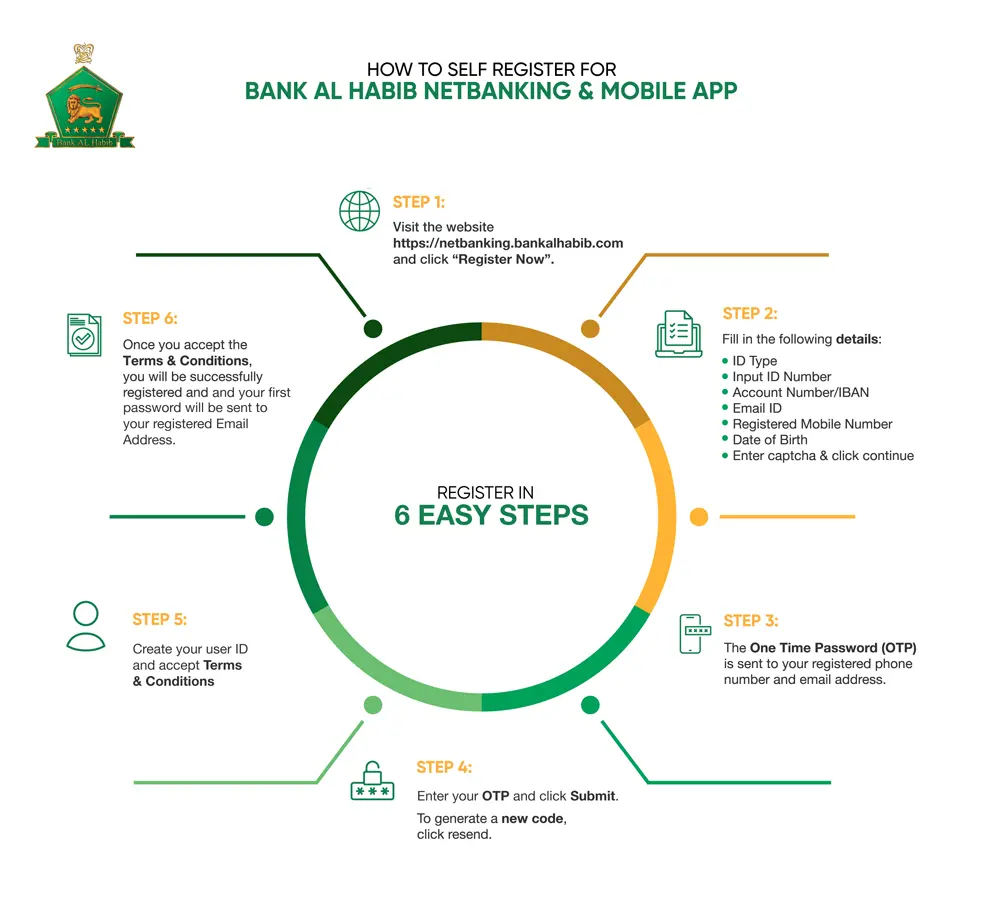
New users that have an active account in Bank AL Habib, can register to AL Habib Netbanking service by following the below procedure:
- Go to Bank AL Habib Netbanking website that is, https://netbanking.bankalhabib.com/
- Thoroughly read and accept the Netbanking Security Tips by ticking ‘I have read, understood, and accept the above security recommendations.’
- Click ‘Register Now’ under Login button from main log-in screen.
- Fill out details as per Bank AL Habib records on registration screen to proceed further.
- Enter required OTP (One Time Password) received on registered Mobile Number & Email address.
- Create User ID as per Bank’s User ID Policy.
- Registration is now successful with Bank AL Habib Netbanking / AL Habib MOBILE and customer may login with system generated password sent on registered email address.
The information you provide is kept strictly confidential. And the latest electronic encryption technology ensures the secure transfer of information over the Internet.
Because account security is important to us, we have built safety measures into AL Habib Netbanking / AL Habib MOBILE which reflect the importance of this issue.
Youll be allowed to change your own password, and all information sent and received is encrypted.
You must enter OTP which is received only on your registered Mobile number or email address upon logging into AL Habib Netbanking / AL Habib MOBILE.
User may register their device as a trusted device to ensure a secure and safe login. Your password is confidential and should never be shared with anyone.
- Keep your password confidential.
- Never leave your device unattended while logged on to AL Habib NetBanking / AL Habib MOBILE.
- Don’t use your date of birth, telephone number, address, your name or the name of a friend or relative in your password.
- Never save your password in Web Browser.
We recommend that you change your password frequently. Your password is your 'key' to AL Habib NetBanking / AL Habib MOBILE, so it's important that you take precautions to keep it confidential. Under the Conditions of Use, you are obligated to protect your password. To change your password, use the 'Change Password link from your side bar menu.
As long as you log out properly and maintain appropriate personal security procedures, your AL Habib NetBanking / AL Habib MOBILE can be just as secure on a shared computer as a personal computer.
In case of you forgot username or password of AL Habib Netbanking / AL Habib MOBILE account, click the following links on the login home screen to reset Username/Password:
- Keep your password confidential.
- Forgot Username? Click the link to retrieve Username
| Fund Transfer Type | Per day limits in Netbanking |
|---|---|
| Own Account | PKR 4,000,000 |
| Within BAHL Account | PKR 2,000,000 |
| Other Bank (IBFT) | PKR 500,000 |
If you believe your AL Habib Netbanking / AL Habib MOBILE information has been compromised or you notice a transaction you did not initiate, you must contact your concerned branch, where your account is maintained or call (+92 21) 111-014-014.
If you transfer funds to your Bank AL Habib accounts, which allow access via the ATM, you will be able to withdraw any available funds immediately.
No. To arrange an International Telegraphic Transfer, please contact your concerned branch, where your account is maintained
You should Contact your concerned branch, where your account is maintained during banking hours or call anytime (24 hours a day, 7 days a week) at (+92 21) 111-014–014 for assistance and support. We look forward to serving you.
No, you cannot have multiple AL Habib Netbanking / AL Habib MOBILE IDs. Same Credentials are used on both web and mobile platforms.
OTP is “One Time Password” which is used to authenticate your transaction(s) and login.
You can block your AL Habib Netbanking / AL Habib MOBILE account by contacting our 24/7 Call Center at (+92 21) 111-014-014. After your successful verification on phone, our PBO will temporarily block your AL Habib NetBanking / AL Habib MOBILE account.
In order to perform different financial transactions, payee / beneficiary can be added in “Manage Payee & Billers” section. Once the payee / beneficiary is added you do not need to provide all the details every time transaction is initiated with the same payee / beneficiary, and no additional OTP is required. While for addition of each payee/beneficiary, an OTP will be required which is delivered to your registered email address and mobile number.
To delete a payee/beneficiary, go to the “Manage Payee & Billers” tab, select the payee you want to delete and click ‘delete payee’.
You can perform funds transfer within Bank AL Habib or to any other 1Link member Bank in Pakistan through this option without adding a payee/beneficiary.
All funds transfer transactions performed through AL Habib Netbanking / AL Habib MOBILE are available under “Funds Transfer History” tab in “Payments & Transfers” section.
Funds are transferred instantly. However, if there is any delay, please contact our 24/7 Call Center at (+92 21) 111-014-014 or write to us at info@bankalhabib.com for assistance
You can use “Multiple Transfers” tab in “Payments & Transfers” section for multiple transfers to your added payee's/ beneficiaries.
You can transfer funds to any Bank AL Habib account, as well as any 1-Link member banks account. Following is the list of banks:
- ADVANCE MICROFINANCE BANK
- ALBARAKA
- ALLIED BANK LIMITED
- APNA MICROFINANCE BANK
- ASKARI BANK LIMITED
- BANK ALFALAH LIMITED
- BANK OF KHYBER
- BANK OF PUNJAB
- BANK ISLAMI
- CITIBANK
- DUBAI ISLAMIC BANK
- FINCA
- FINJA EMI WALLET
- FAYSAL BANK LIMITED
- FIRST WOMEN BANK
- HABIB BANK LIMITED
- HABIB METROPOLITAN BANK
- ICBC
- JS BANK LIMITED
- KMBL KHUSHALI MICRO FINANCE BANK
- MCB ARIF HABIB SAVINGS
- MCB BANK LTD
- MCB ISLAMIC BANK LTD
- MEEZAN BANK LIMITED
- MOBILINK MICROFINANCE BANK
- NAYAPAY
- NBP FUNDS MANAGEMENT
- NRSP
- NATIONAL BANK OF PAKISTAN
- PAYMAX
- SAMBA
- SILK BANK
- SINDH BANK
- SONERI BANK
- STANDARD CHARTERD BANK
- SUMMIT BANK
- TELENOR MICROFINANCE BANK LTD
- THE FIRST MICROFINANCE BANK LTD
- U MICROFINANCE BANK
- UNITED BANK LIMITED
- ZARAI TARAQYATI BANK LTD
Yes, you can use the option “Upcoming Payments” for Standing Instructions and/or Pay Later. These features have been introduced in AL Habib Netbanking / AL Habib MOBILE for your convenience.
You can use “Multiple Bill Payments” tab in “Payments & Transfers” section for multiple payments against your registered billers
You can stop payment of your cheque(s) by selecting “Stop Cheque” option. Cheque(s) can be stopped through Cheque Number and/or Range (From – To).
You can check your cheque(s) status by selecting “Cheque Inquiry” option. Cheque(s) inquiry can be performed through Cheque Number, Range (From – To) and/or Cheque Status.
You can initiate a request by selecting “With Holding Tax/Balance Certificate” option in certificates section. Requested certificate will be sent to you at your registered email address within 30 minutes.
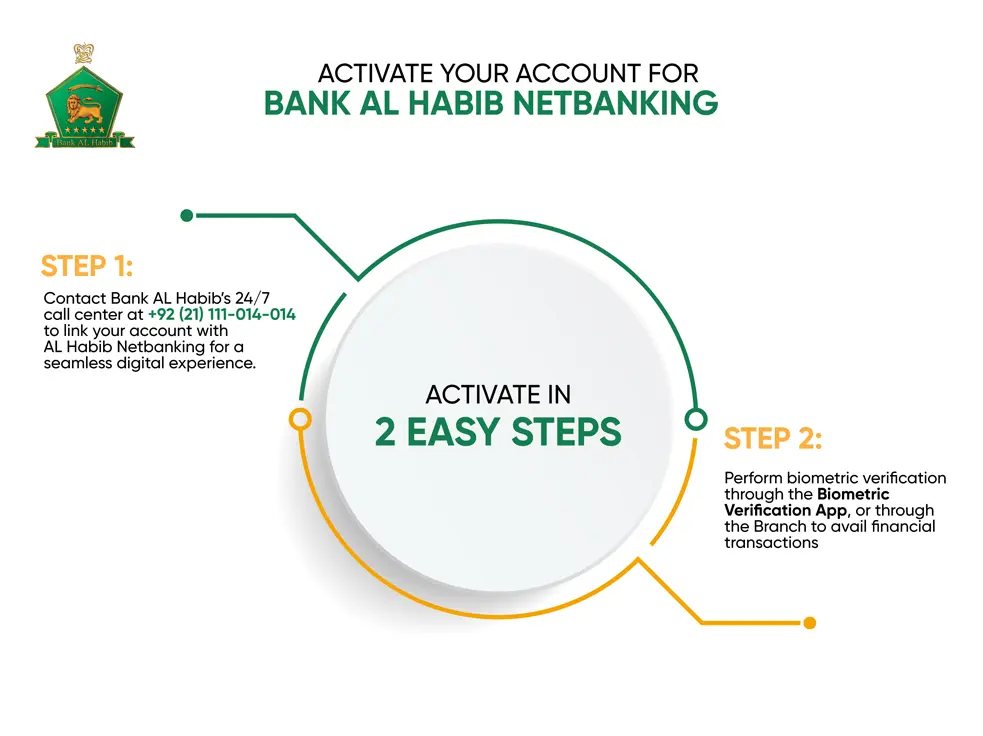
You can link your other account(s) by contacting our 24/7 Call Center at (+92 21) 111-014-014
Please contact our 24/7 Call Center at (+92 21) 111-014-014 for assistance.
You can pay bills for the following Billers:
| All Companies | |
|---|---|
| 1-Bill | Other Bank Credit Card Bill, Invoice/Voucher Payment, Top-up & Variable Payments |
| Aggregator | Kuickpay, PayPro, Haball |
| Clubs | Creek Club, Dreamworld, Karachi Boat Club, Karachi Club |
| Corporate / Dealer Payments | Tapal Tea Pvt Ltd |
| DHA Payments | DHA IR, DHA Lahore |
| Electricity | GEPCO, HESCO, KE New Connection, Kelectric, LESCO, MEPCO, PESCO, SEPCO |
| Fertilizers | Engro Fertilizer |
| Gas | SNGPL, SSGC |
| Gov of Punjab Tax | PRA |
| Insurance | ALICO, EFU Insurance - Conventional, EFU Insurance - Takaful, Jubilee Life Insurance - ADHOC, Jubilee Life Insurance - INDEX, Jubilee Life Insurance - NON INDEX, PAKQATAR GENERAL TAKAFUL, PAKQATAR Family Takaful Renewal, PAKQATAR Family Takaful TopUp |
| Internet | 1LOAD, NAYATEL, Qubee, Qubee Distributor, Wateen, WORLD CALL, Wi-Tribe |
| Investment | AKD Investment, Askari Investment Management Ltd, MCB-Arif Habib Savings and Investments Ltd, AL Meezan Investment, UBL Fund Managers |
| Online Store | Mobilink Jazz Cash |
| PTCL | PTCL LandLine, PTCL Evo Prepaid, PTCL Evo Postpaid, PTCL Defaulter, PTCL Vfone |
| Residential Pay (Maint/Rent/Install) | Askari Colony, Askari-V, Karachi |
| Schools / Colleges | Aitchison College, Beaconhouse School System, Green Shield Public School, Haque Academy, Habib Public School, Habib Girls School, Karachi Public School, Links Education Foundation, LUMS, IBA - Karachi, New Generation High School, New Generations School, United Medical and Dental College UM PSGH PLTD, Head Start Pvt Ltd, Green Island Fnd School |
| SECP Payments | SECP |
| Shipping Companies | DP World |
| Tax Payment | FBR, SRB |
| Telco Post Paid Companies | Mobilink Post Paid, Telenor Post Paid, Ufone Post Paid, Zong Post Paid |
| Telco Pre Paid Companies | Mobilink Pre Paid, Telenor Pre Paid, Ufone Pre Paid, Ufone Supercard, Zong Pre Paid |
| Traveling | Daewoo Express, Careem |
| Ufone Franchise | Ufone Franchise North, Ufone Franchise Central1, Ufone Franchise Central2, Ufone Franchise South |
| Water and Sewerage | FWASA, KWSB, HWASA |
| Welfare | Sindh Worker Welfare Fund |
Following are the per transaction limits for Mobile Top Ups Postpaid:
| Postpaid Telecom Company | Amount Limit |
|---|---|
| Mobilink | PKR 500 to PKR 100,000 |
| Telenor | PKR 50 to PKR 5,000 |
| Ufone | PKR 500 to PKR 5,000 |
| Zong | PKR 50 to PKR 20,000 |
Following are the per transaction limits for Mobile Top Ups Prepaid:
| Prepaid Telecom Company | Amount Limit |
|---|---|
| Mobilink | PKR 30 to PKR 5,000 |
| Telenor | PKR 50 to PKR 5,000 |
| Ufone | PKR 50 to PKR 5,000 |
| Zong | PKR 50 to PKR 5,000 |
Please use the latest version of following Internet Browsers for seamless Netbanking experience.
- Google Chrome
- Firefox
- Apple Safari
- Internet Explorer
Device Binding is a technology that extracts unique properties from the customer`s device to mark it as a Registered Device. It also notifies the customer of access to AL Habib Netbanking / AL Habib MOBILE from an Untrusted Device.
Additionally, if a customer marks a Device as a Trusted Device on OTP screen, then the OTP is not required by customer upon logging-in from their Registered Devices in future.
- Device Binding strengthens the security control and protects from real time fraud.
- Customers may bind more than one device and maximum of three devices as their Trusted Device.
- When Customer logs in from an Untrusted Device, Alert messages notifies that someone has logged in from an untrusted device.
- Auto Read OTP feature is made available to customers, that reads OTP as received through SMS on Android Mobile devices.
Customers are recommended to clear Browser cache every fortnightly when using AL Habib Netbanking / AL Habib MOBILE.
You have to visit your BAHL relationship branch and submit Record Updation Form to update your email address and/or mobile number. Your email address and/or mobile number will be updated within 3 working days.
Immediately contact our 24/7 Call Centre at (+92 21) 111-014-014 to temporarily block your AL Habib Netbanking / AL Habib MOBILE Account.
For unblocking of AL Habib Netbanking / AL Habib MOBILE account, you are required to contact our 24/7 Call Center at (+92 21) 111-014-014 from your registered number. After your successful verification on phone, our PBO (Phone Banking Officer) will un-block your AL Habib Netbanking / AL Habib MOBILE account.
All Bank AL Habib active CASA account holders maintaining following types of accounts with valid CNIC/Passport can use this service.
- Individual
- Sole proprietor
- Joint Account (Either or Survivor)
In case you have forgotten your password, you can also contact our 24/7 Call Center at (+92 21) 111-014-014 to receive system generated password on registered email address. Your password is confidential and should never be shared with anyone.
You cannot change your User ID; however, you may change your password through the 'Change Password' option.
You can view your Account Statement for last 6 months Using View Statement Option. However, you can also request for Account Statement for last 3 years through Request Statement Option, which is then sent to you on your registered email address.
At present AL Habib Netbanking / AL Habib MOBILE is FREE. However; Bank reserves the right to apply charges anytime through its Schedule of Charges.